Let’s say you are working in an environment with hundreds or thousands of devices. All of these devices are managed from a nice simple management server, ready for you to configure.
However, you want to start monitoring this stack of devices as well. That could mean hundreds or even thousands of devices to configure.
Not only that, these management servers and associated platforms (usually found on DAS or other Network equipment) often include monitoring tools such as API to discover resources and SNMP to receive traps.
How to
Let’s paint a picture here, as it speaks more than words in these technical setups.
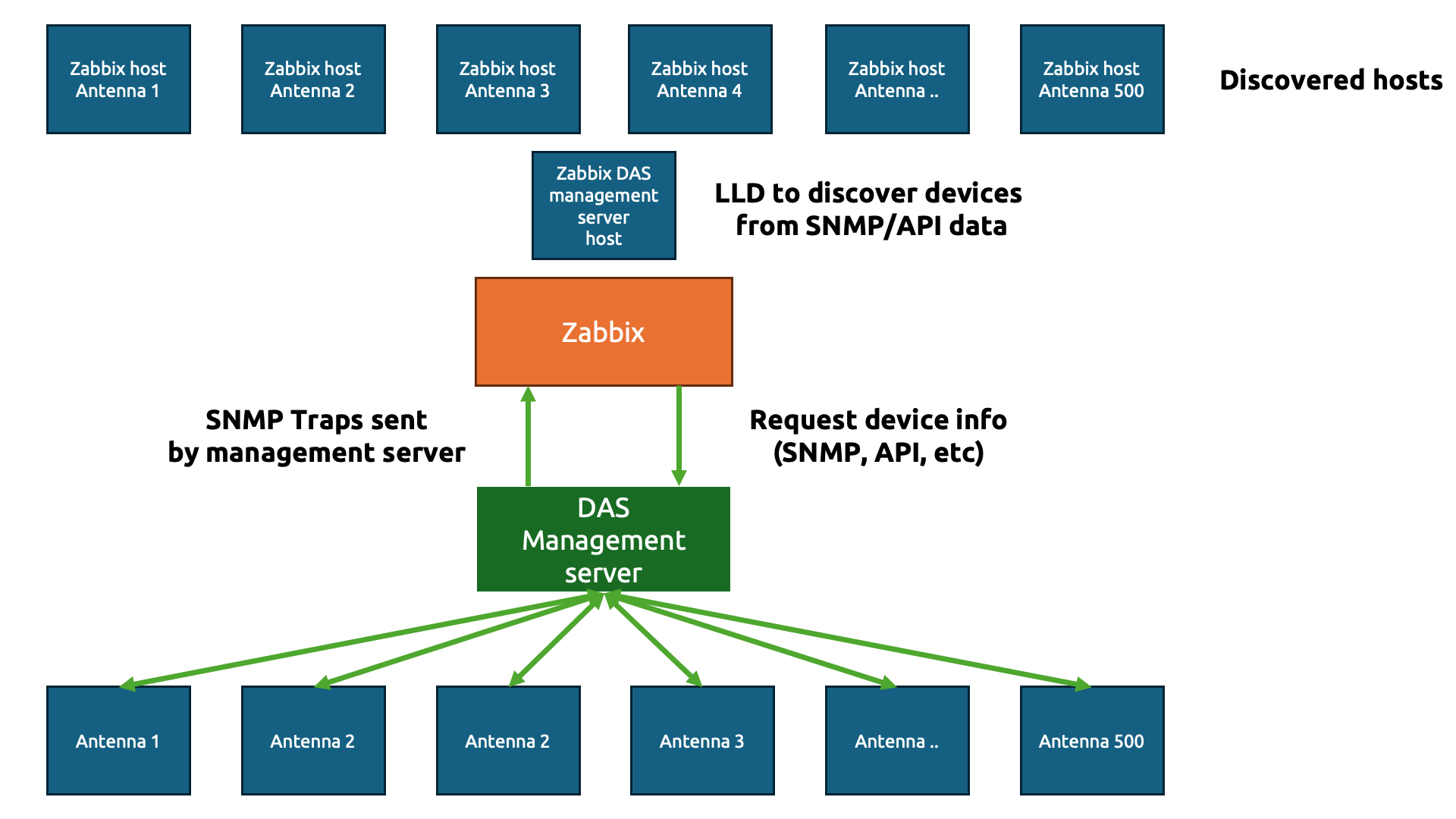
The goal here is simple – we are going to do the usual IT engineer trick and be as lazy as possible to get to the simplest solution (please tell me that isn’t just me!)
We only want to create a simple template (technically two) to gather data from those hundreds or thousands of physical devices. In Zabbix, we start with a template to gather the information about the devices. Let’s say we gather the antenna details using an API and the JSON output looks something like this:
{
"data": [
{
"device_name": "Antenna 1",
"model": "AX-900",
"location": "Roof Sector A",
"serial_number": "SN-A1-001"
},
{
"device_name": "Antenna 2",
"model": "AX-900",
"location": "Roof Sector B",
"serial_number": "SN-A2-002"
},
{
"device_name": "Antenna 3",
"model": "BX-450",
"location": "Basement Level 1",
"serial_number": "SN-A3-003"
}
]
}
Perfect JSON for us to parse through in Zabbix. Now, we need to create our host to collect the DAS management server data first.
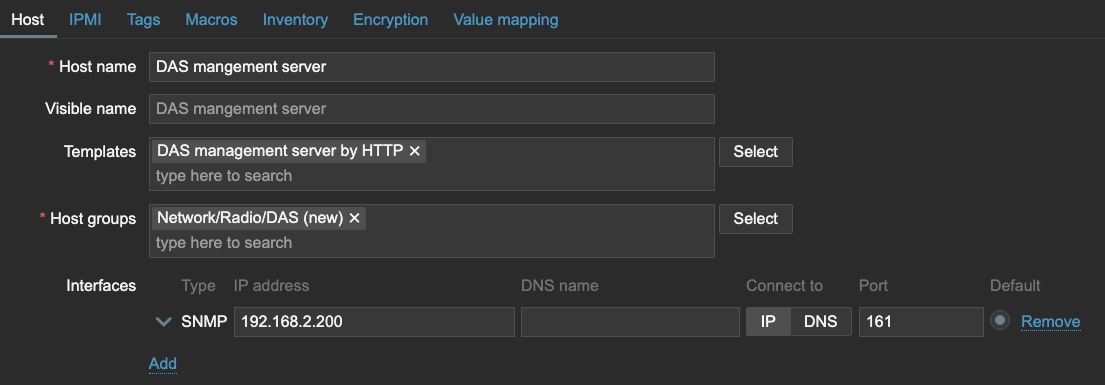
We can use that host to get the data with an item in Zabbix and then send it straight over to Low-Level Discovery.
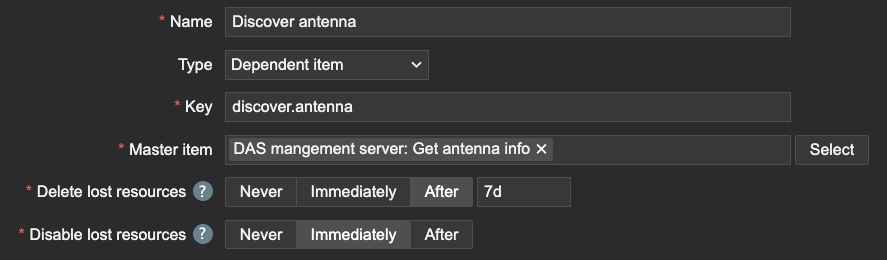
Of course, we need to make sure to capture the name of the antenna devices using JSONPath.

Within this Low-Level Discovery rule, we can then create our Host prototype. Interestingly, since the DAS management server will be sending over all of the data, we should inherit the SNMP interface. All of the Antenna devices will have the same IP address as the DAS management server on this interface, but this will be important later for our SNMP traps.
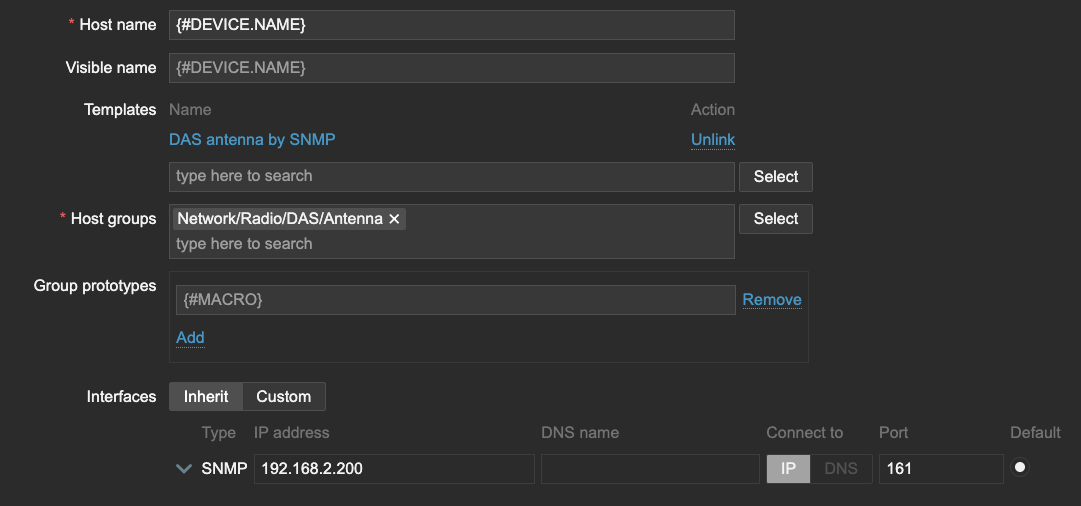
I also want to store the LLD macro {#DEVICE.NAME} as a User macro {$DEVICE.NAME}, which will be important when we create our Antenna template.

Now, let’s see what happens when LLD runs. All of the Antenna are discovered and added to our Zabbix environment. The template DAS Antenna by SNMP is hooked up to the host and all of them have the SNMP interface, just like the DAS management server.

On the template DAS antenna by SNMP, let’s create the SNMP trap item.
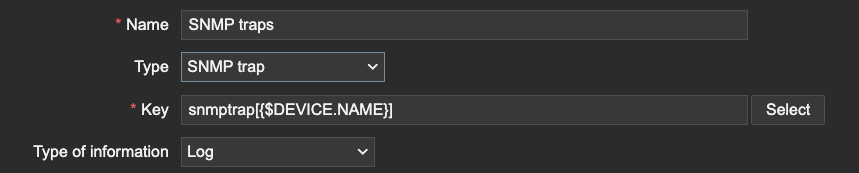
This is where we need the macro we used earlier. The macro will serve as a (part of) the snmptrap item key. Since the SNMP trap items use REGEX to match traps, we can filter only the traps that are related to our device information. We can even extend this further by matching specific OIDs, but only if our Macro is also present after the OID or somewhere else in the trap for example.

Conclusion
The trick here is quite simple. Zabbix matches SNMP trap information based on the IP address.
2025-01-30 10:04:23 2024-01-30
10:04:21 2025-01-30T10:04:21+0200 UDP: [192.168.2.200]:56585->[192.168.2.41]:162
DISMAN-EVENT-MIB::1.3.6.1.5.1.51.1.1 = Antenna 1
As long as the host SNMP IP address matches the IP address within the trap and the REGEX in your SNMP trap item, Zabbix will process the trap, even if it is across 500 hosts. Be careful however, as this also means that you could be duplicating traps if your SNMP trap item REGEX isn’t strict enough.
Another thing is to be mindful of the amount of traps being processed in combination with complex regular expressions. The SNMP trap process within Zabbix server and proxy is a single threaded process. A ticket for improvement is open here.
I hope you enjoyed reading this short example! If you have any questions or need help configuring anything on your Zabbix setup feel free to contact me and the team at Opensource ICT Solutions.
Nathan Liefting


 Prev Post