In this blog post, I will show you how to create a template for monitoring your Docker server with only API calls (without the Zabbix agent 2). Instead of creating a template, templated items, LLD rules, and trigger prototypes from scratch, we will adapt them from the existing template “Docker by Zabbix agent 2.”
How does the Zabbix agent 2 do it?
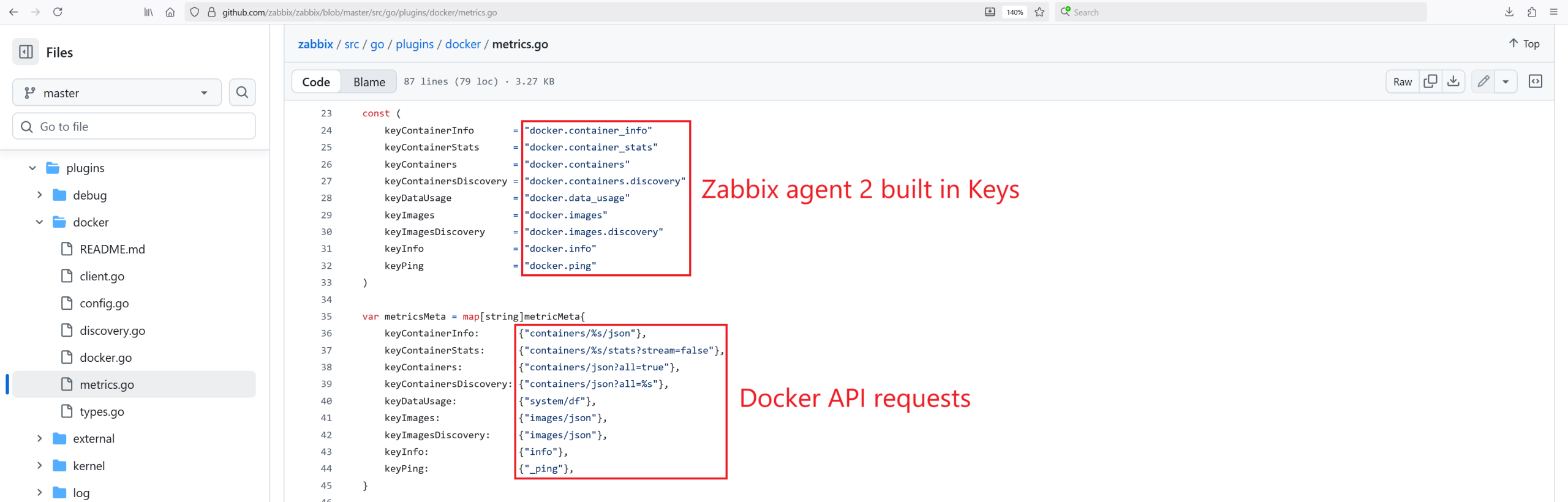
If you are wondering how the Zabbix agent 2 collects the data, you can look into the source code and see the magic behind the scenes: https://github.com/zabbix/zabbix/blob/master/src/go/plugins/docker/metrics.go.
In short, it uses a Unix non-TCP socket, makes the Docker API requests on the host, and returns JSON objects. Hey, we already know how to use it ourselves from the previous blog post, right?
For the Zabbix agent 2 to work with the Docker template, it needs access to the Unix socket, either by adding the user Zabbix to the group: Docker or running the Zabbix-agent2 as root.
How we will do it
I can adapt this template, improvise whenever I encounter a non-existing metric, and overcome any technical challenge with effort! For the most part, in the template we have a few Zabbix agent items that collect data in bulk and a lot of dependent items (and dependent item prototypes from the LLD rules).
The path forward is quite straightforward – we will clone the template and replace the Zabbix agent item type with the HTTP agent type item and add additional parameters shown below. I will also add additional user macros on the template, including the Docker server IP address, port, CA, SSL certificate, and key file names so that these can be adjusted on the host level.
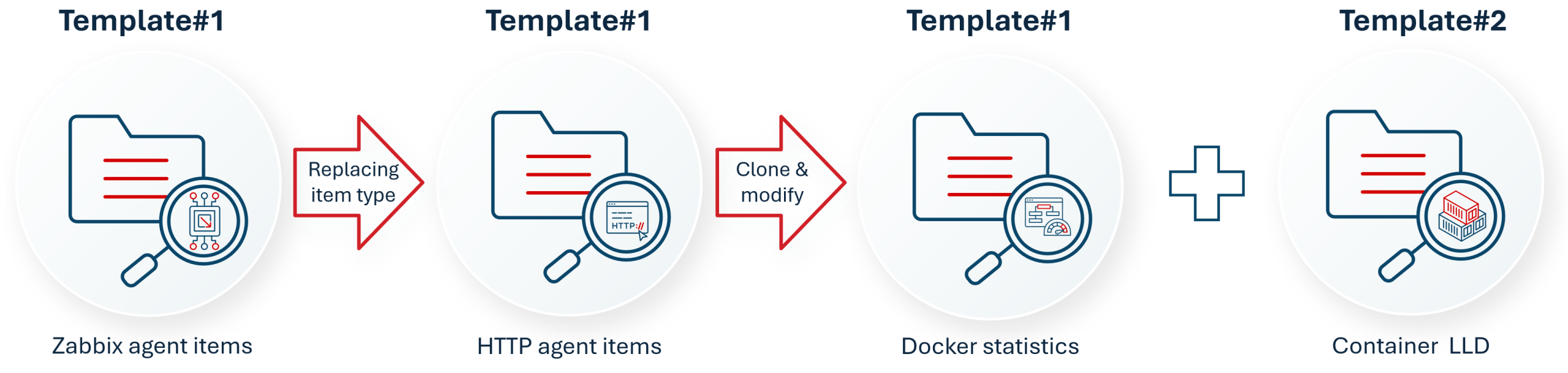
Cloning the template and changing the item type
First, clone the template “Docker by Zabbix agent 2” and give it a new name: “Docker stats by HTTP.” Next, modify the Templated Zabbix agent type item configuration with the following parameters:
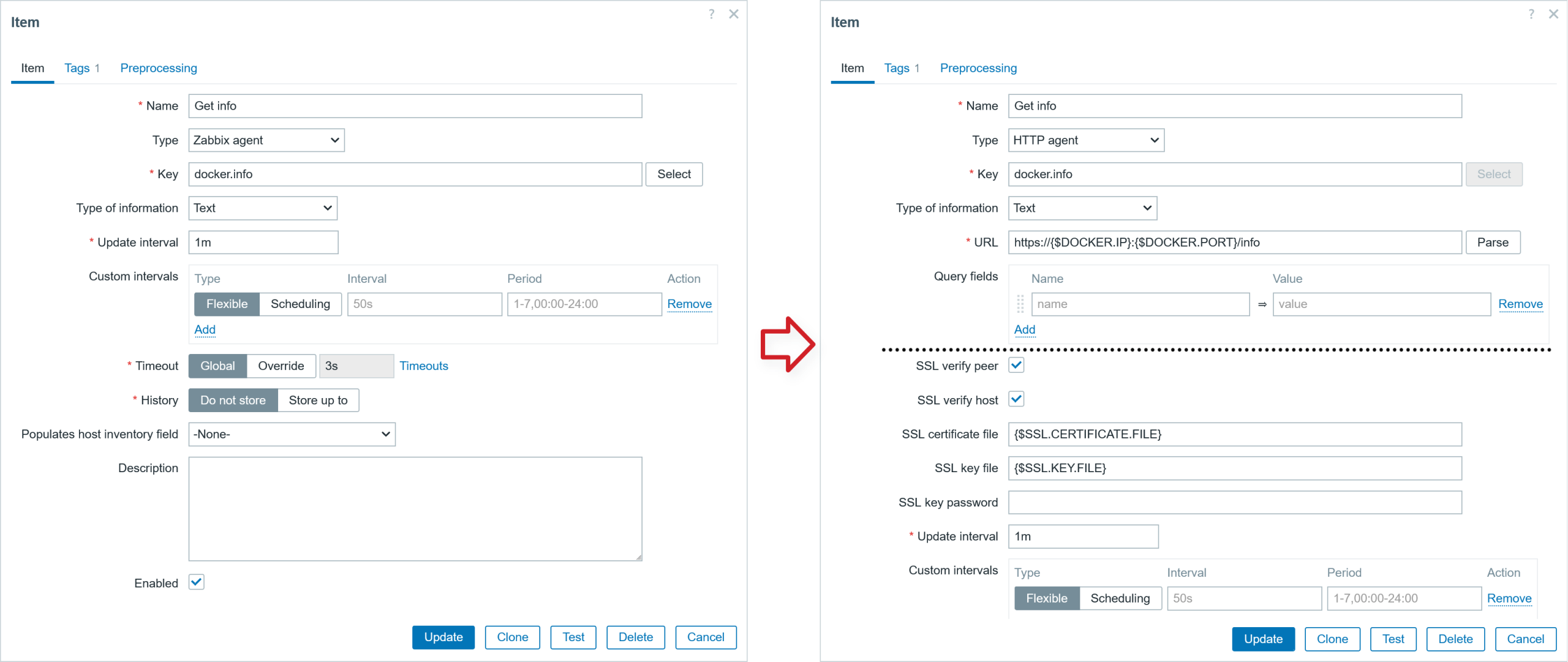
Modify “Docker by HTTP” template items:
● Modify item: Get containers
  ▪ Type: HTTP agent
  ▪ URL: https://{$DOCKER.IP}:{$DOCKER.PORT}/containers/json?all=true
  ▪ Type of inf: Text
  ▪ SSL verify peer: Checked
  ▪ SSL verify host: Checked
  ▪ SSL certificate file: {$SSL.CERTIFICATE.FILE}
  ▪ SSL key file: {$SSL.KEY.FILE}
  ▪ SSL key password: {$SSL.KEY.PASSWORD}
● Modify item: Get data_usage
  ▪ Type: HTTP agent
  ▪ URL: https://{$DOCKER.IP}:{$DOCKER.PORT}/system/df
  ▪ Type of inf: Text
  ▪ SSL verify peer: Checked
  ▪ SSL verify host: Checked
  ▪ SSL certificate file: {$SSL.CERTIFICATE.FILE}
  ▪ SSL key file: {$SSL.KEY.FILE}
  ▪ SSL key password: {$SSL.KEY.PASSWORD}
● Modify item: Get images
  ▪ Type: HTTP agent
  ▪ URL: https://{$DOCKER.IP}:{$DOCKER.PORT}/images/json
  ▪ Type of inf: Text
  ▪ SSL verify peer: Checked
  ▪ SSL verify host: Checked
  ▪ SSL certificate file: {$SSL.CERTIFICATE.FILE}
  ▪ SSL key file: {$SSL.KEY.FILE}
  ▪ SSL key password: {$SSL.KEY.PASSWORD}
●Modify item: Get info
  ▪ Type: HTTP agent
  ▪ URL: https://{$DOCKER.IP}:{$DOCKER.PORT}/info
  ▪ Type of inf: Text
  ▪ SSL verify peer: Checked
  ▪ SSL verify host: Checked
  ▪ SSL certificate file: {$SSL.CERTIFICATE.FILE}
  ▪ SSL key file: {$SSL.KEY.FILE}
  ▪ SSL key password: {$SSL.KEY.PASSWORD}
● Modify item: Ping
  ▪ Type HTTP agent
  ▪ URL: https://{$DOCKER.IP}:{$DOCKER.PORT}/_ping
  ▪ Type of inf: Text
  ▪ SSL verify peer: Checked
  ▪ SSL verify host: Checked
  ▪ SSL certificate file: {$SSL.CERTIFICATE.FILE}
  ▪ SSL key file: {$SSL.KEY.FILE}
  ▪ SSL key password: {$SSL.KEY.PASSWORD}
♯ Preprocessing (additional first step)
  ▪ Boolean to Decimals
We also need to modify the LLD rule configuration. Change item type from Zabbix agent type to HTTP agent type:
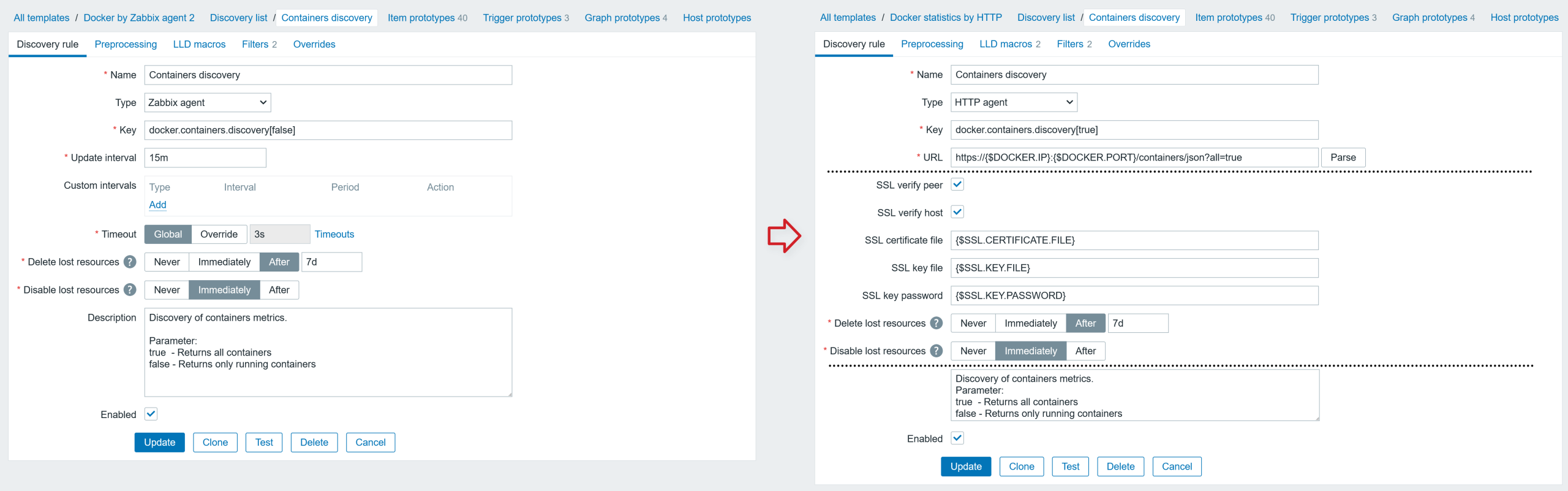
Modify LLD rule: Containers discovery
● Discovery rule
  ▪ Type: HTTP agent
  ▪ Key: docker.containers.discovery[true]
  ▪ URL: https://{$DOCKER.IP}:{$DOCKER.PORT}/containers/json?all=true
  ▪ SSL verify peer: Checked
  ▪ SSL verify host: Checked
  ▪ SSL certificate file: {$SSL.CERTIFICATE.FILE}
  ▪ SSL key file: {$SSL.KEY.FILE}
  ▪ SSL key password: {$SSL.KEY.PASSWORD}
  ▪ Update interval: 1h
● LLD macros
  ▪ {#ID}   $.Id
  ▪ {#NAME} $.Names.first()
Modify LLD rule: Images discovery
● Discovery rule
  ▪ Type: Dependent item
  ▪ Master item: item> Get images
● LLD macros
  ▪ {#ID}   $.Id
  ▪ {#NAME} $.RepoTags
After that, we will also make changes in the LLD rule “Containers discovery” by modifying a few existing item prototypes (Zabbix agent type) and adding a new item. Below are the item prototypes that require modification:
● In LLD rule Containers discovery, modify parameters for item prototype: Container {#NAME}: Get info
  ▪ Type: HTTP agent
  ▪ URL: https://{$DOCKER.IP}:{$DOCKER.PORT}/containers{#NAME}/json
  ▪ SSL verify peer: Checked
  ▪ SSL verify host: Checked
  ▪ SSL certificate file: {$SSL.CERTIFICATE.FILE}
  ▪ SSL key file: {$SSL.KEY.FILE}
  ▪ SSL key password: {$SSL.KEY.PASSWORD}
● In LLD rule Containers discovery, modify item prototype: Container {#NAME}: Get stats
  ▪ Type: HTTP agent
  ▪ URL: https://{$DOCKER.IP}:{$DOCKER.PORT}/containers{#NAME}/stats?stream=false
  ▪ SSL verify peer: Checked
  ▪ SSL verify host: Checked
  ▪ SSL certificate file: {$SSL.CERTIFICATE.FILE}
  ▪ SSL key file: {$SSL.KEY.FILE}
  ▪ SSL key password: {$SSL.KEY.PASSWORD}
● In LLD rule Containers discovery, modify parameters for item prototype: Container {#NAME}: CPU percent usage
  ▪ Type: Calculated
  ▪ Formula: last(//docker.container_stats.cpu_usage.total.rate["{#NAME}"])/last(//docker.container_stats.system_cpu_usage.total.rate["{#NAME}"])*last(//docker.container_stats.online_cpus["{#NAME}"])*100
♯ Preprocessing (delete preprocessing step JSONPath)
● In LLD rule Containers discovery, add new item prototype: Container {#NAME}: System CPU total usage per second
  ▪ Name: Container {#NAME}: System CPU total usage per second
  ▪ Type: Dependent item
  ▪ Key: docker.container_stats.system_cpu_usage.total.rate["{#NAME}"]
  ▪ Type of information Numeric (float)
  ▪ Master item    prototype > Container {#NAME}: Get stats

♦ Tags (name:value)
  ▪ component:cpu
  ▪ container:{#NAME}

♯ Preprocessing

  ▪ JSONPath       $.cpu_stats.system_cpu_usage
  ▪ Change per second
  ▪ Custom multiplier: 1.0E-9
Cloning the template (again) and making minor modifications
Next, I will clone the template “Docker statistics by HTTP” and give the copy a new name – “Docker containers by HTTP.” In the template “Docker containers by HTTP,” delete the LLD rule Images discovery; delete templated items; from the LLD rule “Containers discovery” rule, delete all prototype entities (item prototypes), and add a filter in the LLD rule (shown below):
In LLD rule Containers discovery rule, in Filter tab: add additional filter option
Filters [type of calculation: A and B and C]
   ▪ {#ID} matches {HOST.HOST}
I have also created a host group “Docker” where the discovered container hosts will be added. In the template “Docker statistics by HTTP” delete all item prototypes in the LLD rule “Containers discovery.” We will create a Host prototype in the LLD discovery rule “Containers discovery” – the parameters are shown below:
Host prototype in LLD rule: Containers discovery
  ▪ Host name:     {#ID}
  ▪ Visible name:  {#NAME}
  ▪ Templates:     Docker containers by HTTP
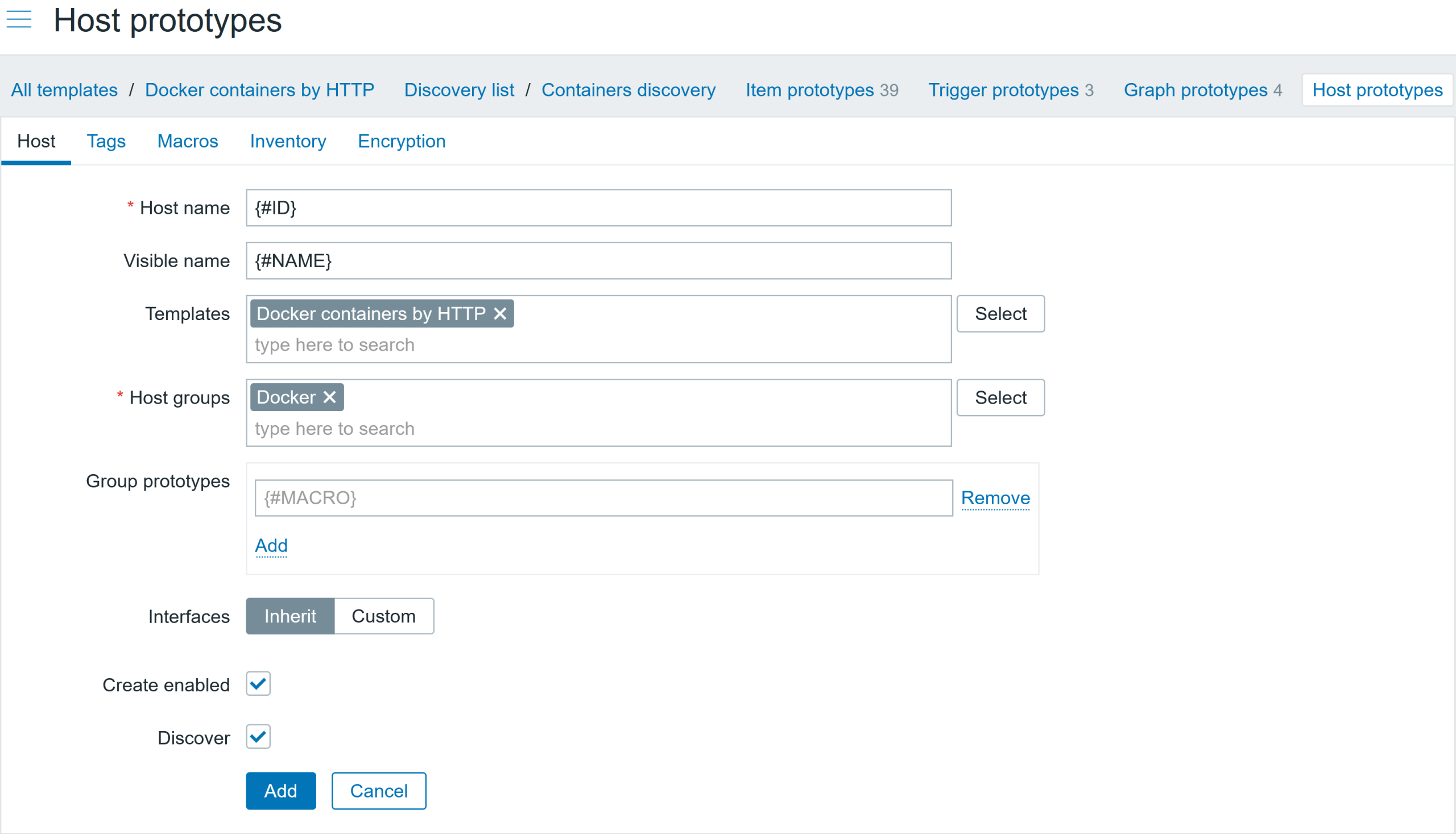

Creating a host and linking the template
Now all that is left is to create a host and link a template: “Docker statistics by HTTP.” Do not forget to add the correct Docker IP address or DNS name in the user macro.
I have created a new host “Docker server,” linked a template, and modified the user macro for the Docker IP address. This host will collect Docker overall statistics. After the LLD discovery execution, the container names will be automatically discovered and container hosts will be created with a linked template.
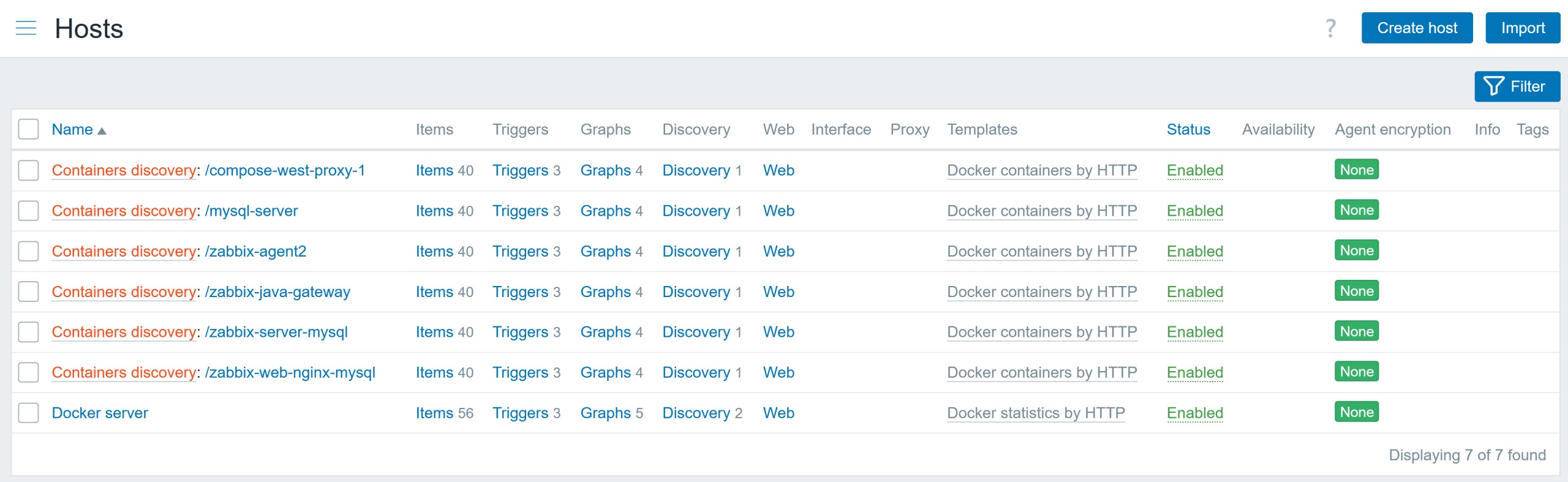
If for some reason you are monitoring multiple Docker instances, you could have the same container names discovered, which will lead to LLD errors, as there can’t be hosts with the same name (container ID) or visible name (container name). Quick solution – for each Docker instance, add a prefix to each container name. Another solution – don’t split the template into two parts, then the items will be discovered under the same host, and you will not have this issue.
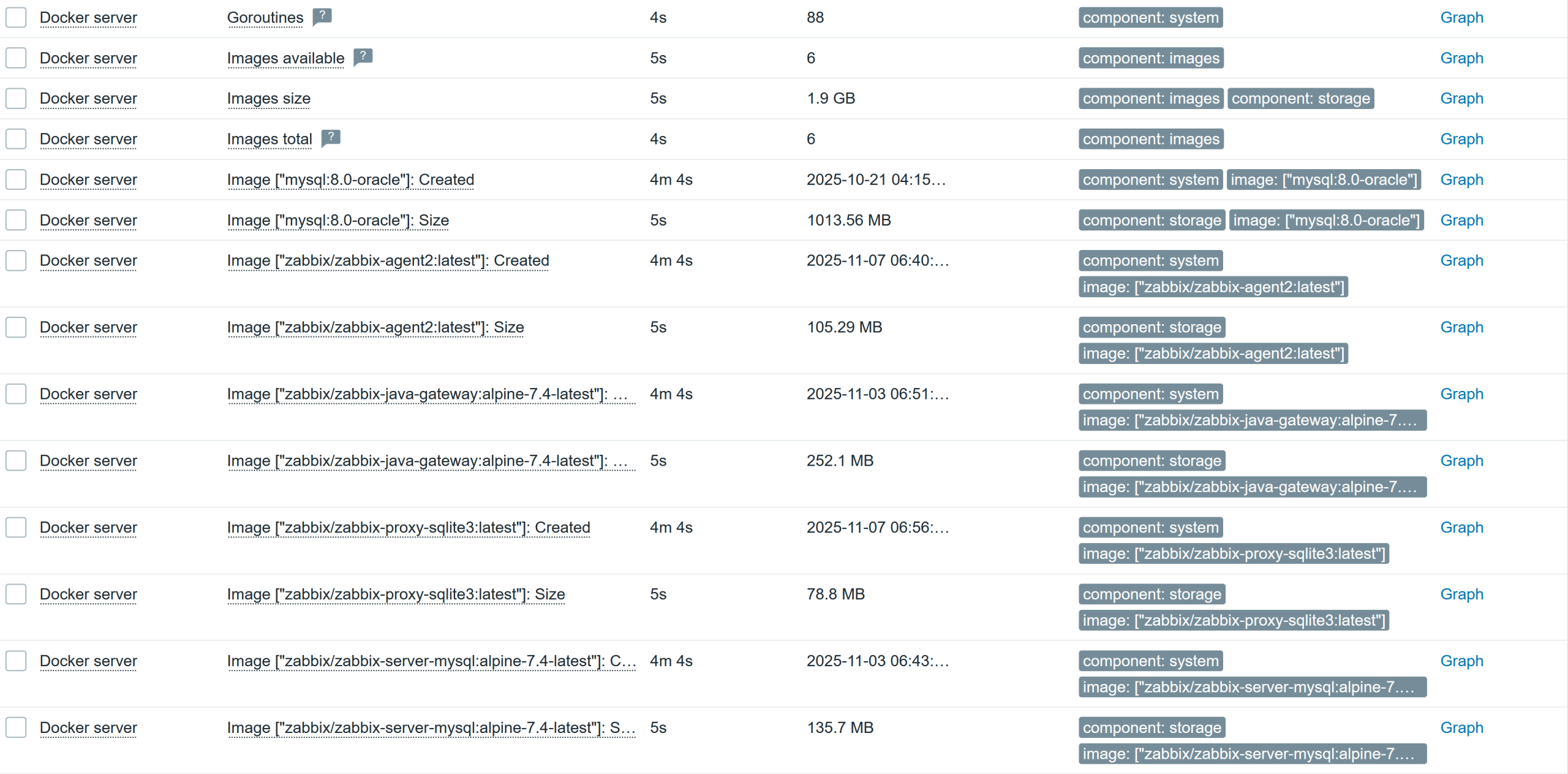
The Docker server host shows general information about the Docker server’s overall state and status:
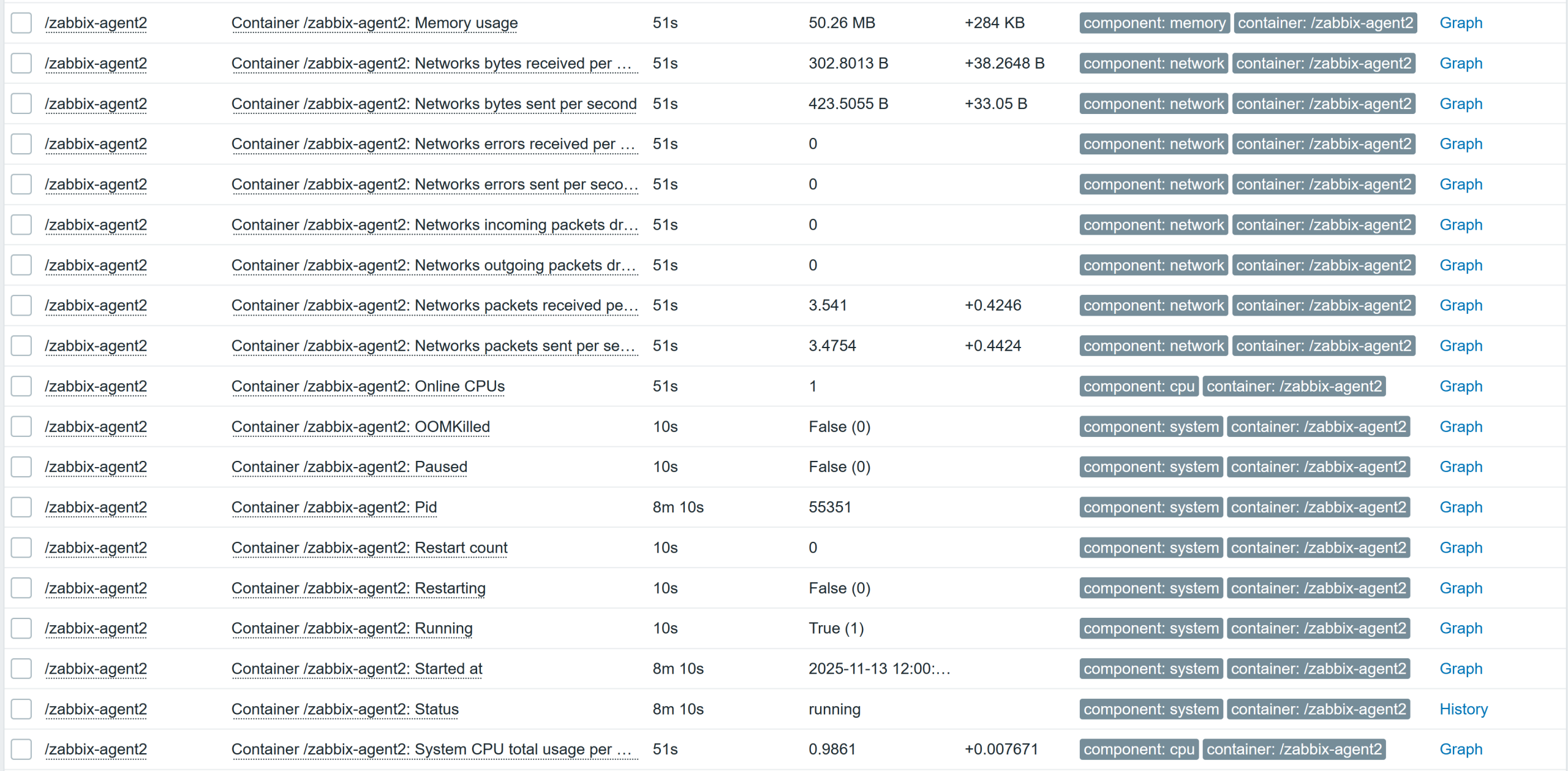
A host will be created automatically for each discovered container and will collect the container-specific performance metrics:
Summary
Now you and I know a little bit more about how Zabbix agent2 is collecting Docker metrics. This blog post has shown you how to improvise and adapt existing templates with different data collection methods. Zabbix is a very versatile tool that you can use in multiple ways to get the data if you have some technical constraints. The included template can also be used as is, or you can modify it to suit your needs.

 Prev Post